

Why Teams Are Leaving PagerDuty in 2026
A viral thread reignited the PagerDuty exodus debate. Here is what is driving it and where teams are moving.
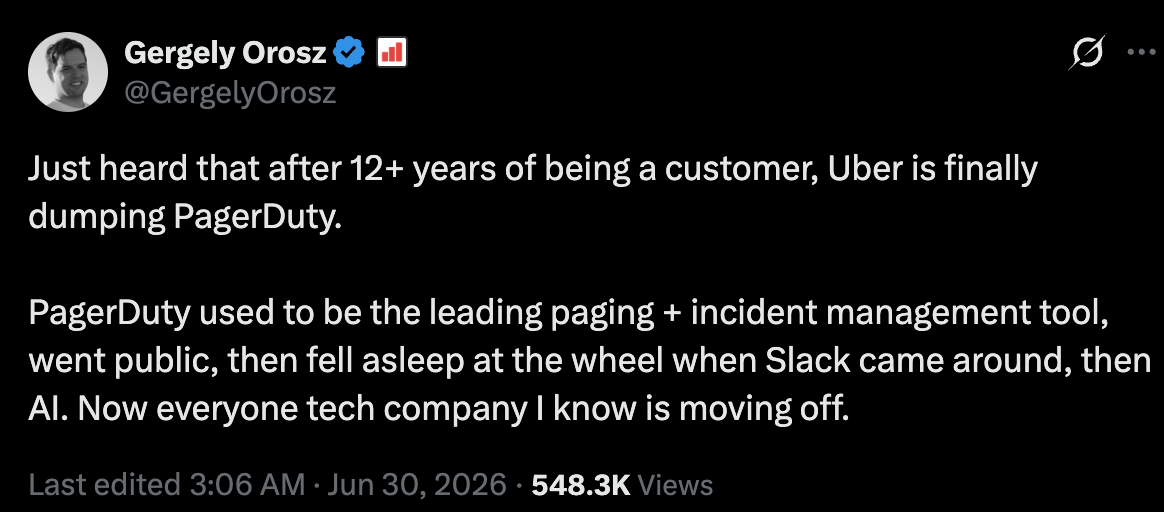
Short answer: A widely shared thread from engineering writer Gergely Orosz on June 30, 2026 reported that Uber is leaving PagerDuty after more than a decade, and the replies filled with engineers describing the same move. The recurring reasons are high and rising prices, dated user experience, and slow innovation. Teams are shifting to modern, Slack-native tools. For Slack-first teams that want flat pricing, Pagerly is a strong option.
Key takeaways
| Theme from the discussion | What teams want instead |
| High and rising per-user pricing | Flat, predictable pricing |
| Dated UX, slow innovation | Modern, Slack-native workflow |
| Reliability and contract friction | Simple setup and support |
What happened
In a thread that drew hundreds of thousands of views, engineering writer Gergely Orosz reported that Uber, a customer for more than twelve years, is moving off PagerDuty. He argued that PagerDuty led the paging and incident category, then lost momentum as Slack changed how teams work and again as AI reshaped incident response. The replies echoed the theme, with many engineers saying their companies are moving off it too. This is a social-media discussion rather than an official announcement, so treat the specifics as reported sentiment; you can read the original thread on X.
The reason the thread resonated is that it named out loud what a lot of engineering leaders have been quietly weighing at renewal time. When a company that has paid for a tool for over a decade decides to leave, it gives everyone else permission to run the same evaluation. That is why the replies turned into a running list of teams doing the same thing and a chorus of readers asking the same question: what should we move to? For a category that rarely trends on social media, an incident-response tool becoming the main character for a day is itself a signal that the status quo is under strain.
Why teams say they are leaving PagerDuty
Across the thread, a few reasons came up again and again.
Cost, and rising renewals
The most common complaint was price. Engineers described large renewal quotes and high per-user business-plan pricing, and said competitors now offer more for less. Per-user pricing is the structural issue: the bill grows with every engineer added to on-call, so cost climbs as a team succeeds and hires. Some in the thread said their renewal quotes had jumped sharply, which is exactly the moment teams start shopping.
Dated experience and slow innovation
Several replies described the product as dated and hard to manage, and felt innovation had stalled for years while rivals added modern incident workflows. The sentiment was that the moat has eroded as adjacent tools bundle alerting, routing, uptime checks, and incident response. When the surrounding category catches up on features, a premium price becomes harder to justify.
Reliability and contract friction
Some engineers cited reliability gaps, such as dropped support for certain phone country codes, and aggressive contract negotiation that pushed them to migrate faster rather than renew. Reliability is the one thing a paging tool cannot get wrong, so even isolated lapses erode trust quickly.
The AI factor
A theme running underneath the thread was AI. Incident response is one of the clearest places for AI to help, by drafting timelines, summarizing what happened, suggesting likely causes, and writing the first draft of a post-mortem while responders focus on the fix. Teams increasingly expect these capabilities built in, and the perception in the thread was that the incumbent moved slowly here while newer tools shipped AI-assisted workflows. When a tool feels a generation behind on the most visible new technology, switching starts to feel less risky than staying.
The structural problem with per-user pricing
The deeper issue behind the thread is the pricing model, not any single feature. Per-user pricing means the cost of being reachable scales with the size of your engineering org, even though your incident volume usually does not. A team that grows from ten to thirty engineers can triple its on-call bill without running a single additional incident. That creates two bad behaviors: finance pushes back on adding engineers to rotations, and platform teams ration who gets paging access to control spend. Neither is good for reliability.
Flat, per-team pricing removes this tension. The cost is tied to the team, not the headcount, so adding an engineer to on-call is free. The table below shows how a per-user model compares with a flat per-team plan as a team grows, using an approximate per-user business rate against a flat plan.
| On-call size | Per-user tool (approx) | Flat per-team plan |
| 10 engineers | Scales with seats | Stays flat |
| 30 engineers | Roughly triples | Stays flat |
| 50 engineers | Roughly five times | Stays flat |
PagerDuty's own tiers reinforce the point. The paid Professional and Business plans are priced per user per month, and advanced incident-response and AIOps capabilities sit in the higher tiers or add-ons. As you move up to unlock the modern features, the per-seat multiplier applies to the higher rate, which is how a growing team ends up with a renewal quote that shocks the finance team.
The bigger shift behind the story
The thread is a symptom of a larger change in how engineering teams run on-call. Work moved into Slack, so teams expect to acknowledge alerts, run incidents, and see who is on call without opening a separate dashboard. AI now drafts post-mortems and summarizes timelines. And teams are done with pricing that scales per seat. The tools winning this moment are Slack-native, priced flat or predictably, and actively adding modern workflow and AI features.
What a modern on-call stack looks like in 2026
If you are re-evaluating PagerDuty, these are the traits worth scoring in any replacement.
1. Slack-native operation
The full workflow, not just alerts, should run in Slack: scheduling, paging, incident channels, and who is on call. This removes the context switching that slows response.
2. Predictable pricing
Flat or per-team pricing keeps cost stable as you grow and makes budgeting simple. See how Pagerly prices per team.
3. Automatic usergroup sync
A Slack group like @oncall should always point at the current responder, without manual updates. This is core to Pagerly.
4. Modern incident response with AI
Look for automatic incident channels, roles, stakeholder updates, and AI-generated post-mortems, as in the Pagerly incident bot.
5. Painless migration
The tool should import your existing PagerDuty schedules so switching is a same-day job, not a rebuild.
Where teams are going
The discussion surfaced several alternatives, and different tools fit different needs.
- Pagerly for Slack-first teams that want on-call, paging, and incidents in Slack at flat per-team pricing. See Pagerly vs PagerDuty.
- Incident.io for teams that want a premium, dedicated incident-response product, priced per responder. See Pagerly vs Incident.io.
- Opsgenie for existing Atlassian shops, though its standalone future has been uncertain since the platform changes. See Pagerly vs Opsgenie.
- Grafana for teams deep in the Grafana stack, though the open-source OnCall was archived in 2026. See Pagerly vs Grafana OnCall.
- Better Stack for teams that want uptime monitoring and on-call together. See Pagerly vs Better Stack.
- Sentry for smaller teams that mainly need alerting alongside error monitoring.
For a broader list, see our guide to the best on-call tools for developers and the PagerDuty pricing breakdown.
A balanced view: what to verify before you switch
A viral thread is a strong signal, not a final verdict. Before you make a decision, do the basic diligence. Confirm the specific claims that matter to you rather than taking the loudest reply at face value, since a social thread selects for frustration. PagerDuty remains a capable, mature platform with deep integrations and a large event-management footprint, and for some large enterprises those integrations are the reason to stay. Map your must-have integrations against any replacement, run a real page through it during a trial, and check that phone and SMS delivery works in every country where you have responders. The goal is to replace sentiment with a short, honest evaluation you can defend to your team.
Why Pagerly fits this moment
Pagerly is built for exactly the shift the thread describes. It is a Slack-native on-call and incident platform used by more than 1,000 organizations, including teams at 1Password, Disney+, Spotify, and Loom.
- Flat per-team pricing. The Basic plan is 19 US dollars per team per month and Starter is 39 US dollars per team per month, with paging at 4 US dollars per user per month. Cost does not grow with headcount. See pricing.
- Runs in Slack. On-call scheduling, paging, and incident response happen in Slack, including automatic @oncall usergroup sync.
- Modern and AI-assisted. The incident response bot creates channels, assigns roles, and drafts AI post-mortems.
- Easy migration. Pagerly imports your PagerDuty schedules, documented in the docs.
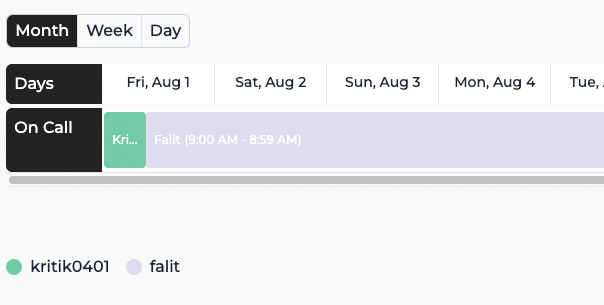
How to move off PagerDuty
A migration does not have to be a quarter-long project. The typical path is a single afternoon.
- Add Pagerly to your Slack workspace.
- Import your PagerDuty schedules and escalation policies via the docs.
- Turn on @oncall usergroup sync and connect your monitoring tools.
- Route a few low-severity alerts through Pagerly to validate paging and escalation.
- Run incidents through the incident bot, then cut over fully.
What PagerDuty customers should do right now
If your renewal is approaching, the practical move is to run a short evaluation before you sign. Pull your current per-user cost, model it at your projected headcount for the next two years, and compare it with a flat per-team plan. Trial a Slack-native tool in parallel on a single team so responders can feel the difference during a real page. Keep your schedules exportable so you are never locked in. Even if you stay, walking into the renewal with a credible alternative changes the conversation.
Frequently asked questions
Basics
Is Uber really leaving PagerDuty? The claim comes from a widely shared thread by Gergely Orosz, not an official announcement. Treat it as reported sentiment and read the source thread.
Why are teams leaving PagerDuty? The recurring reasons in the discussion are high and rising per-user pricing, dated UX, and slow innovation.
Is PagerDuty a bad product? No. It is a mature platform with deep integrations. The thread is about fit and value at renewal, not a claim that it does not work.
Pricing
What is a cheaper alternative? Pagerly is flat per team from 19 US dollars per month, versus PagerDuty's per-user model. See pricing.
Why is per-user pricing a problem? Cost scales with headcount even when incident volume does not, so growing teams pay more each year for the same coverage.
Migration
Can I import my PagerDuty schedules? Yes, per the docs.
How long does it take to switch? Most teams are live in minutes to a single afternoon because Pagerly installs into Slack and imports schedules.
Will we lose our escalation policies? No. Escalation policies and rotations come across during import, so on-call coverage is preserved from day one.
The takeaway
Whether or not every detail in the thread holds up, the direction is clear: engineering teams want Slack-native, modern, predictably priced on-call, and the incumbent's per-user model is under pressure. If you are re-evaluating PagerDuty, Pagerly gives you on-call, paging, incidents, and automatic @oncall usergroup sync in Slack at flat per-team pricing. Compare in Pagerly vs PagerDuty, check the pricing, or read the docs. Add Pagerly to Slack for free.