

Workflow
On-Call Paging with Phone Calls, SMS and Escalation
Page whoever is on call by phone, SMS, email, Slack and mobile push, and escalate L1 to L2 to L3 until someone acknowledges. $4 per responder.
Every channel, all enabled
- Slack
- SMS
- Phone call
- Mobile app
All five are on by default, phone calling included - no add-on to switch on and no separate plan to buy.
Take pages on your phone or desktop
Reliable on-call paging for engineering teams: schedules, escalation policies and alerts from your monitoring tools in one place.
Schedules, escalation and integrations
Everything needed to get an alert to the right person, and keep escalating until someone answers.
On-call schedules and escalation
From a simple weekly rotation to complex follow-the-sun schedules, which Pagerly can build from a plain-English description. Define escalation from L1 to L2 to L3.

Phone call, SMS and Slack notifications
The on-call engineer gets a phone call, SMS, email, push notification and a Slack message for every page, and can acknowledge and update the incident from Slack.
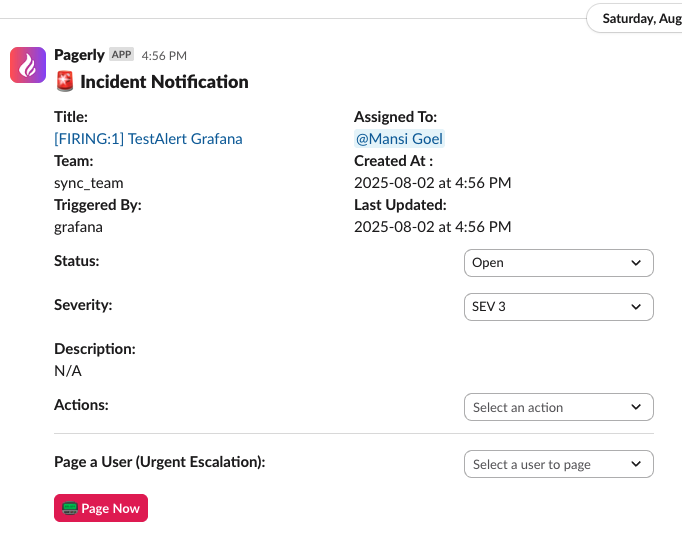
Integrations with your monitoring tools
Incidents are created automatically from AWS, Datadog, Sentry and 40+ other tools.


On-call paging makes sure an alert reaches a person, not just a channel. When monitoring fires, Pagerly finds whoever is on call right now from your rotation, pages them by phone call, SMS, email, Slack and mobile push, and keeps escalating until someone acknowledges.
How on-call paging works
1. An alert arrives
Incidents are raised automatically from AWS CloudWatch, Datadog, Sentry, Grafana and 40+ other tools, or by anyone in Slack with a single command.
2. The on-call engineer is paged
Pagerly looks up the current on-call from the rotation, including overrides and swaps, and pages them on every channel at once: phone call, SMS, email, Slack and push notifications in the iOS, Android and macOS apps.
3. Escalation if nobody acknowledges
If the primary does not acknowledge within the time you set, the page escalates L1 to L2 to L3: the secondary on-call, then the team lead or a manager. Acknowledging stops the escalation for everyone.
4. Resolve and review
Acknowledge, update and resolve from Slack or the app. Pagerly records MTTA and MTTR for every incident so you can see whether on-call is getting quieter.
Why teams use Pagerly as their on-call pager
- Pages land even when Slack is down: paging runs on Pagerly infrastructure, not on Slack.
- Schedules and escalation in one place: build rotations in Slack, or sync them from PagerDuty, Opsgenie or Google Calendar.
- AI help for complex schedules: describe the rotation in plain English and Pagerly builds it.
- Pay only for people who can be paged: $4 per responder per month on top of a per-team plan. Everyone who just needs to see the schedule stays free.
- Migrating from Opsgenie before its April 2027 shutdown: import schedules, escalation policies and integrations in one click.
On-call paging FAQ
What is on-call paging?
Automatically contacting the engineer on call when an alert fires, by phone, SMS, push or chat, and escalating to someone else if they do not respond in time.
Can Pagerly replace PagerDuty or Opsgenie for paging?
Yes. Pagerly pages by phone call, SMS, email, Slack and mobile app with multi-level escalation policies, and can import your existing schedules and escalation policies.
Is there an on-call pager app for my phone?
Yes. Pagerly has iOS, Android and macOS apps for push alerts, acknowledging and resolving incidents away from your laptop.
How much does on-call paging cost?
Paging is $4 per responder per month, added to the Basic ($19 per team) or Starter ($39 per team) plan. You only pay for people in the paging rotation.
Put your on-call where your team already is.
Install in two minutes. Import your existing schedule. Page someone tonight.