

Best On-Call Tools for Developers (2026)
A developer-focused guide to the best on-call tools in 2026, compared on Slack workflow, pricing, and incidents.
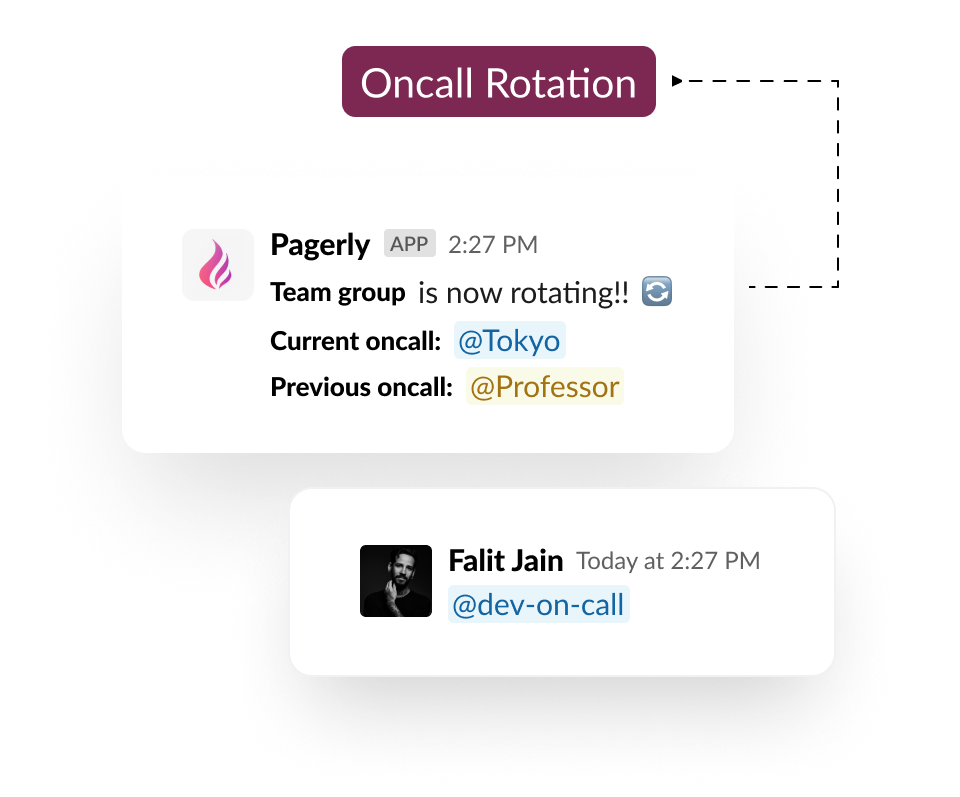
Short answer: The best on-call tool for most developers in 2026 is Pagerly, because it runs on-call scheduling, paging, and incident response natively in Slack at flat per-team pricing. PagerDuty and Incident.io are strong for large enterprises, while Grafana OnCall and Spike.sh suit specific niches. This guide ranks the top options and explains which fits which kind of developer team.
Key takeaways
| Tool | Best for | Pricing model |
| Pagerly | Slack-first developer teams | Flat per team, from $19/mo |
| PagerDuty | Large enterprises | Per user, per month |
| Incident.io | Incident-heavy scale-ups | Per responder |
| Grafana OnCall | Grafana Cloud users | Paid cloud (OSS archived) |
| Spike.sh | Small teams on a budget | Low-cost tiers |
How on-call changed for developers in 2026
Two shifts define on-call in 2026. First, work moved into Slack, so developers expect to acknowledge alerts, run incidents, and find who is on call without opening a separate dashboard. Second, AI now drafts post-mortems and summarizes incident timelines, which cuts the busywork that used to follow every page. Tools that assume a web-first workflow feel dated against Slack-native options. The best on-call tool for a developer team is the one that fits where the team already works and does not bill per seat as the team grows.
What developers should look for in an on-call tool
On-call tools are not all the same. Developers should weigh these criteria before choosing.
1. Slack-native workflow
If your team lives in Slack, the tool should run there end to end, not just send alerts. Pagerly manages rotations, paging, and incidents inside Slack, including automatic @oncall usergroup sync so a mention always reaches the current responder.
2. Pricing model
Per-user pricing grows with every engineer added. Flat, per-team pricing stays predictable. See the Pagerly pricing page for transparent per-team plans.
3. Scheduling flexibility
Look for round-robin and custom rotations, overrides, and reminders. Pagerly lets you create round-robin rotations on Slack, documented in the developer docs.
4. Paging and escalation
Critical alerts need call and SMS paging with multi-level escalation. Pagerly offers on-call paging for reliable wake-ups, with L1 to L2 to L3 escalation so a missed page is retried automatically.
5. Incident response and RCA
The best tools open an incident channel, assign roles, and draft a post-mortem. Pagerly's incident response bot does this with AI-generated RCA and MTTA and MTTR tracking.
6. Integrations
Confirm support for your monitoring and ticketing stack. Pagerly connects with Datadog, Sentry, AWS, and Jira through its integrations, and offers a two-way Jira sync.
The best on-call tools for developers
1. Pagerly (best overall for Slack teams)
Pagerly is a Slack-native on-call and incident platform used by more than 1,000 organizations, including teams at 1Password, Disney+, Spotify, and Loom. It is built for developer teams that coordinate in Slack and want to avoid per-user pricing.
Key features: Slack-native rotations, automatic @oncall usergroup sync, call and SMS paging with escalation, incident channels with roles, AI post-mortems, schedule import from PagerDuty and Opsgenie, and a two-way PagerDuty sync.
Pros: Flat per-team pricing, full workflow in Slack, fast setup, AI RCA included.
Cons: Best suited to teams that already use Slack.
Pricing: Basic at $19 per team per month and Starter at $39 per team per month, with paging at $4 per user per month and a custom incident-response tier. See pricing.
Best for: Slack-first developer and SRE teams that want predictable cost. Start in the developer docs.
2. PagerDuty (best for large enterprises)
PagerDuty is the most established platform, with deep integrations and AIOps, priced per user. It suits large organizations with dedicated incident programs, but cost grows with headcount. See our Pagerly vs PagerDuty comparison and the PagerDuty pricing breakdown.
Pros: Mature, broad integrations, strong analytics. Cons: Per-user cost, web-first workflow.
Best for: Enterprises with budget for per-seat pricing.
3. Incident.io (best for incident-heavy scale-ups)
Incident.io is a modern, Slack-first incident tool that added on-call, priced per responder. It is polished but gets expensive as on-call grows. Compare in our Pagerly vs Incident.io guide and the Incident.io pricing breakdown.
Pros: Refined incident workflow. Cons: Per-responder pricing, limited usergroup sync.
Best for: Scale-ups focused on incident response.
4. Grafana OnCall (best for Grafana Cloud users)
Grafana OnCall was part of the Grafana stack, but the open-source version was archived in March 2026, leaving Grafana Cloud IRM as the paid path. See Pagerly vs Grafana OnCall.
Pros: Fits the Grafana ecosystem. Cons: OSS archived, self-hosting overhead.
Best for: Teams committed to Grafana Cloud.
5. Spike.sh (best for small budgets)
Spike.sh offers low-cost incident alerting for small teams, though its Slack integration is alert-focused. See Pagerly vs Spike.sh.
Pros: Inexpensive. Cons: Lighter incident workflow, no usergroup sync.
Best for: Small teams that only need alerts.
On-call tools compared
| Tool | Slack-native | Usergroup sync | Pricing |
| Pagerly | Yes, full workflow | Yes | Flat per team |
| PagerDuty | Partial | No | Per user |
| Incident.io | Yes | Limited | Per responder |
| Grafana OnCall | Alert-focused | No | Paid cloud |
| Spike.sh | Alert-focused | No | Low-cost |
How to choose: a quick decision guide
- Does your team live in Slack? If yes, choose Pagerly for the native workflow.
- Is predictable cost a priority? If yes, choose Pagerly's flat per-team pricing over per-user models.
- Are you a large enterprise with AIOps needs? PagerDuty fits.
- Are you leaving Opsgenie or Grafana OnCall? Pagerly imports schedules and is fully maintained.
- Do you only need cheap alerts for a tiny team? Spike.sh can work.
Use-case cheat sheet
- Startup on Slack: Pagerly Basic plan.
- Team syncing PagerDuty schedules to Slack: Pagerly usergroup sync.
- Growing team worried about per-seat costs: Pagerly flat pricing.
- Enterprise with formal incident command: PagerDuty.
- Grafana OnCall OSS self-hoster: migrate to Pagerly.
- Team drowning in noisy alerts: Pagerly with alert annotation.
Getting started with Pagerly
Setting up on-call in Pagerly takes minutes, not a multi-week rollout.
- Add Pagerly to your Slack workspace from the homepage.
- Create a rotation, or import one from PagerDuty or Opsgenie, following the rotations docs.
- Turn on @oncall usergroup sync so mentions reach the current responder.
- Connect monitoring tools and enable paging for critical alerts.
- Use the incident bot to run incidents and auto-generate post-mortems.
Frequently asked questions
Basics
What is an on-call tool? An on-call tool manages who is responsible for responding to alerts and incidents, handles paging and escalation, and coordinates incident response. Pagerly does this inside Slack.
What is the best on-call tool for developers? For Slack-first developer teams, Pagerly is the best choice because it combines scheduling, paging, and incidents in Slack at flat pricing.
Features
Can developers find who is on call in Slack? Yes. Pagerly shows the current on-call and keeps a synced @oncall usergroup for mentions.
Does Pagerly support escalation? Yes, multi-level escalation through paging.
Pricing
How much do on-call tools cost? Per-user tools like PagerDuty charge roughly 21 to 41 US dollars per user per month, while Pagerly is flat per team from $19 per month. See pricing.
Migration
Can I move my existing schedules? Yes. Pagerly imports schedules from PagerDuty and Opsgenie, documented in the docs.
Why Pagerly is the best choice for developers
For developer teams that run on Slack, Pagerly delivers on-call scheduling, automatic @oncall usergroup sync, call and SMS paging, incident channels, and AI post-mortems in one place, at flat per-team pricing that does not grow with headcount. It imports your existing schedules and sets up in minutes. Explore the paging, rotations, and incident workflows, check the pricing, or read the developer docs. Add Pagerly to Slack for free and run on-call where your team already works.