

Best On-Call Scheduling Tools for Every Team in 2026
Comparison of the best on-call scheduling tools in 2026: pricing models, Slack integration depth, and feature analysis. Pagerly vs PagerDuty, OpsGenie, Grafana OnCall, and more.
Best On-Call Scheduling Tools for Every Team in 2026
PagerDuty costs $21 per user per month on its base plan. For a 20-person engineering team, that is over $5,000 per year before adding a single integration. For many teams, that price point is simply not sustainable.
The best on-call management tools in 2026 offer sophisticated scheduling, escalation policies, Slack integration, and mobile app support at a fraction of what the market leaders charge. This guide covers the best on-call scheduling tools for every team in 2026, evaluated on features, pricing structure, Slack integration depth, and overall value.
What to Look For in an On-Call Scheduling Tool
- Pricing model: Per-team pricing keeps costs predictable. Per-user pricing scales linearly with headcount
- Slack and Teams integration: Deep Slack integration means engineers can acknowledge alerts, swap shifts, and manage escalations without leaving their communication tool
- Escalation policies: Automatic escalation when the primary responder does not acknowledge is non-negotiable for critical systems
- Rotation flexibility: Support for daily, weekly, follow-the-sun, and round-robin rotations
- Mobile app: Push notifications and acknowledgment controls on mobile
- Free plan or trial: Evaluate before committing
- Integration depth: Sync with PagerDuty, OpsGenie, Jira, and your monitoring stack
Best On-Call Scheduling Tools for 2026
1. Pagerly: Best On-Call Scheduling Tool for Every Team
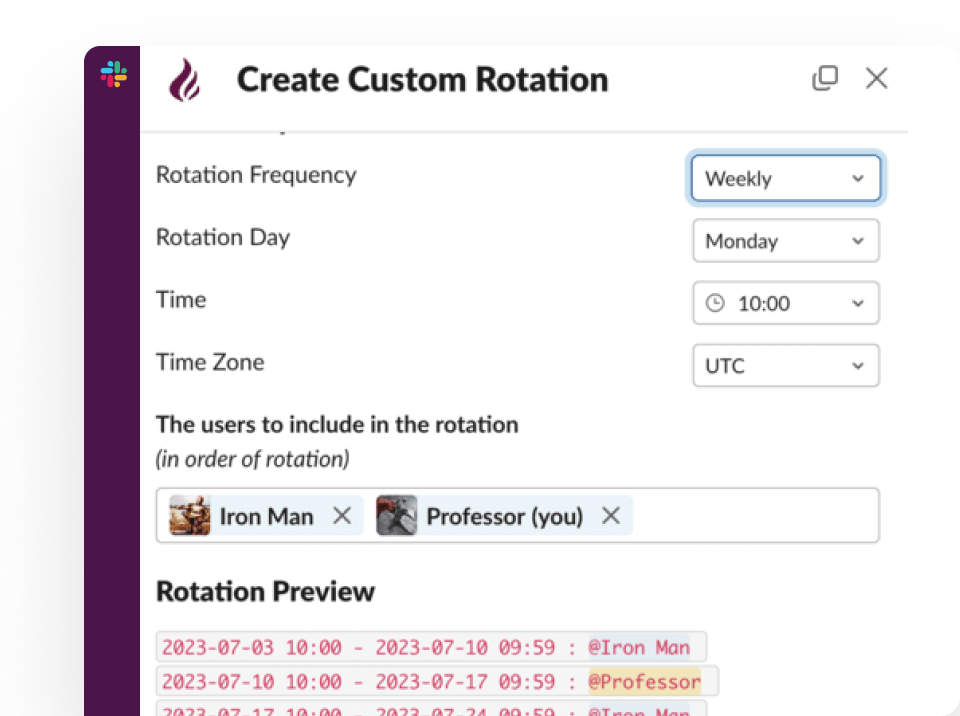
Pagerly is the on-call scheduling tool built for teams that live in Slack. Its per-team pricing model means you are not charged per seat, making it the most cost-effective solution for small, mid-size, and large teams. Every rotation change, every alert, every shift swap, and every incident creation happens inside Slack, without requiring engineers to log into a separate dashboard at 2 AM.
Key features:
- Per-team pricing (not per-user): the same cost whether your team has five or fifty engineers
- Slack usergroup sync: when the rotation changes, @sre-on-call updates automatically
- AI-powered custom rotation creation in plain language
- Multi-user simultaneous on-call for primary and secondary coverage
- Task-based round-robin for PR reviews, QA testing, support ticket assignment
- Cover request system for shift swaps directly in Slack
- Automated shift reminders at 6 hours, 12 hours, and 1 day before a shift
- Handover notifications when rotations change
- Channel topic auto-updates showing who is currently on-call
- Google Calendar integration
- Two-way deep sync with PagerDuty, OpsGenie, Jira, and Datadog
- Emoji-triggered incident and ticket creation from any Slack message
- Free trial available with no credit card required
Best for: Engineering teams, SRE teams, and DevOps teams of all sizes that want cost-effective on-call scheduling inside Slack, without per-user pricing.
2. PagerDuty
PagerDuty is the market leader in on-call management with deep integrations. It is also among the most expensive options.
- Cons: Per-user pricing ($21-$35/user/month), no Slack-native workflow, steep learning curve, overkill for small teams
3. OpsGenie
OpsGenie is Atlassian's on-call tool, tightly integrated with Jira Service Management.
- Cons: Migrating to Jira Service Management (product uncertainty), shallow Slack integration, per-user pricing, limited value outside Atlassian ecosystem
4. Grafana OnCall
Open-source on-call scheduling from Grafana Labs with a free self-hosted option.
- Cons: Self-hosting requires engineering effort, single point of failure if monitoring server goes down, almost no value outside Grafana observability stack
5. Better Stack
Bundles uptime monitoring, logging, and basic on-call scheduling in one platform.
- Cons: On-call is secondary to monitoring, no Slack-native management, limited escalation logic
6. Splunk On-Call (formerly VictorOps)
For organizations running Splunk for observability and security.
- Cons: Effectively requires Splunk subscription, per-user pricing on top of Splunk licensing, legacy UI, poor value outside Splunk ecosystem
On-Call Scheduling Tool Pricing Comparison
| Tool | Pricing Model | Estimated Cost (20-person team) | Slack-Native | Free Trial |
|---|---|---|---|---|
| Pagerly | Per-team | Same as 5-person team | Yes | Yes |
| PagerDuty | Per-user | $5,040–$8,400/year | No | Limited |
| OpsGenie | Per-user | $2,280+/year | No | Free plan (5 users) |
| Grafana OnCall | Free (self-hosted) | Engineering time cost | Partial | Yes |
| Better Stack | Per-user | Variable | No | Free plan |
| Splunk On-Call | Per-user + Splunk | Very high | No | Limited |
Best Practices for On-Call Scheduling on Any Budget
1. Choose per-team pricing over per-user pricing. Per-team pricing lets you include every engineer without cost penalties, resulting in better coverage.
2. Do not sacrifice Slack integration to save money. Tools that require engineers to leave Slack add friction at exactly the wrong moment.
3. Automate shift reminders to prevent coverage gaps. Reminders at 24 hours, 12 hours, and 6 hours before a shift are standard best practice.
4. Build a cover request workflow from day one. A self-service cover request system prevents coverage gaps without involving managers.
5. Use escalation policies at every severity level. Automatic escalation is non-negotiable even for budget-conscious teams.
6. Track on-call load per engineer. Equitable distribution of on-call responsibilities is a key driver of team retention.
Ready to set up affordable, effective on-call scheduling? Pagerly runs entirely in Slack with per-team pricing that stays flat as your team grows. Get started free