

How to Create an On-Call Schedule in Google Sheets
Step-by-step guide to building an on-call schedule in Google Sheets, including formulas, conditional formatting, and when to move to a dedicated tool.
How to Create an On-Call Schedule in Google Sheets
Google Sheets is where many engineering teams start when they need to track an on-call schedule. It is free, accessible to everyone with a Google Workspace account, and flexible enough to build a basic rotation tracker without any special tooling. For small teams with simple rotations and low incident volume, a Google Sheets schedule can work well enough to get started.
The limitations surface quickly as teams grow. A Google Sheets schedule requires someone to manually update it every rotation cycle. It does not send shift reminders. It does not route alerts to whoever is on-call. It does not escalate when the on-call engineer does not respond.
This guide covers how to build a functional on-call schedule in Google Sheets, the limitations you will hit as your team grows, and when it makes sense to move to a dedicated on-call scheduling tool.
What to Include in an On-Call Schedule Spreadsheet
- Date range: The start and end dates for each on-call shift
- On-call engineer (primary): Name and contact information
- Secondary/backup engineer: Who covers if the primary is unreachable
- Phone number: The mobile number for the on-call engineer
- Notes: Any relevant context for the shift
Step-by-Step: Building an On-Call Schedule in Google Sheets
Step 1: Set Up the Basic Structure
Create a new Google Sheet with the following column headers in row 1: Start Date, End Date, Primary On-Call, Primary Phone Number, Secondary On-Call, Secondary Phone Number, Team or Service, Notes. Format date columns correctly and freeze the header row.
Step 2: Populate the Rotation
For a four-engineer weekly rotation, create one row per week. Use a formula in the end date column: =A2+6 to fill in the date six days after the start. Use data validation dropdowns for engineer names to prevent typos.
Step 3: Add Conditional Formatting to Highlight the Current Shift
Use conditional formatting with the custom formula: =AND($A2<=TODAY(),$B2>=TODAY()) to highlight today's active on-call row in green or yellow.
Step 4: Create a Named Range for Easy Lookup
Create a named range for your engineer list (Data, Named Ranges) called EngineerList on a separate Config tab.
Step 5: Add a Summary View for Current On-Call
Use an INDEX/MATCH array formula to show who is on-call right now:=INDEX(C:C,MATCH(1,(A:A<=TODAY())*(B:B>=TODAY()),0))
Step 6: Share the Sheet with the Team
Share with all team members using view-only access. Only the schedule manager should have edit access. Add the sheet link to your team's Slack channel description.
Using Google Apps Script for Automated Reminders
A Google Apps Script can run on a daily trigger and send an email reminder to the upcoming on-call engineer before their shift begins. This adds meaningful value but requires JavaScript knowledge and breaks if the sheet structure changes.
Limitations of Google Sheets for On-Call Scheduling
- No alert routing: The spreadsheet knows who is on-call, but your monitoring tools do not
- Manual rotation updates: Someone has to update the sheet every rotation cycle
- No escalation logic: If the primary engineer does not respond, there is no automatic mechanism to page the secondary
- No shift swap workflow: Swaps are negotiated manually with no self-service process or audit trail
- No integration with Slack or PagerDuty
- No Google Calendar sync
- Grows brittle with team size: A sheet tracking twenty engineers across five services becomes a maintenance burden
When to Move Beyond Google Sheets
- Your team is receiving more than five to ten pages per week and manual coordination is creating delays
- Engineers have missed shifts because the spreadsheet was not updated
- Shift swaps require manager involvement because there is no self-service process
- Your monitoring alerts are going to a shared channel rather than to the specific on-call engineer
- You need separate rotations for multiple teams or services
- Your team is distributed across time zones
The Automated Alternative: Pagerly
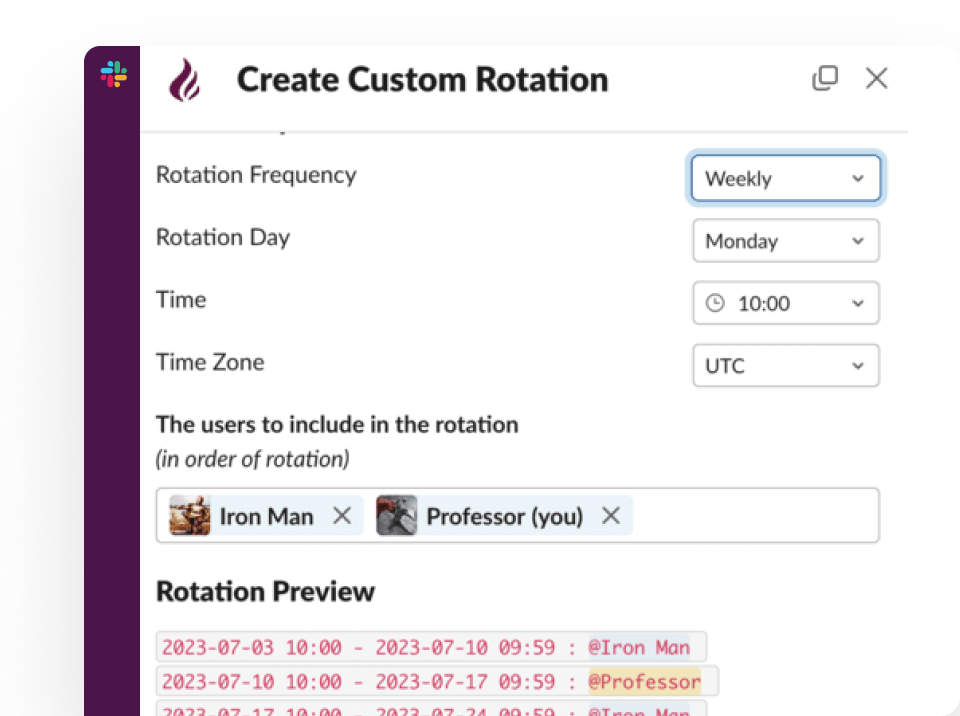
Pagerly replaces the Google Sheets on-call schedule with a system that manages the rotation automatically, routes alerts to the right person, and handles escalation without any manual maintenance.
What Pagerly provides that Google Sheets cannot:
- Rotation management entirely within Slack: create, view, and adjust the schedule without a spreadsheet or external dashboard
- AI-powered rotation creation: describe your scheduling requirements and Pagerly generates the rotation automatically
- Slack usergroup sync: @sre-on-call always reflects the current on-call engineer, updated automatically at every rotation change
- Channel topic auto-updates showing the current on-call engineer in designated Slack channels
- Automated shift reminders at 6 hours, 12 hours, and 1 day before each shift
- Handover notifications at every rotation change with context for the incoming engineer
- Self-service cover request system for shift swaps directly in Slack
- Automatic escalation if the primary on-call engineer does not acknowledge within your defined window
- Google Calendar integration so engineers see on-call shifts alongside their work schedule
- Two-way sync with PagerDuty, OpsGenie, Jira, and Datadog
- Per-team pricing so the cost stays flat as the team grows
Ready to replace your Google Sheets on-call schedule? Pagerly manages your rotation in Slack with automated reminders, usergroup sync, and escalation built in. Get started free