

Best Pager Tools for Developers (2026)
Pager tools for developers compared on call and SMS paging, escalation, and Slack workflow.
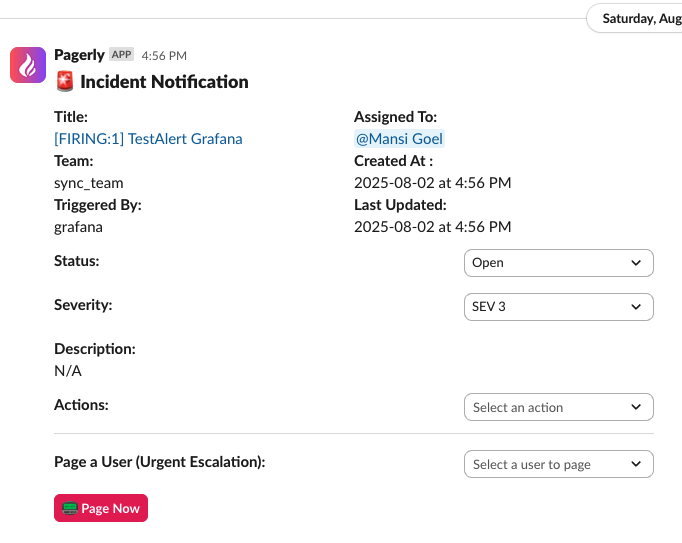
Short answer: The best pager tool for most developers in 2026 is Pagerly, which delivers reliable call and SMS paging with multi-level escalation, driven from Slack at flat per-team pricing. PagerDuty and Splunk On-Call are enterprise options, and Spike.sh is a budget pick.
Key takeaways
ToolBest forPricingPagerlySlack-first developersPaging $4/user/mo on flat planPagerDutyEnterprisesPer userSplunk On-CallSplunk shopsEnterpriseSpike.shBudget teamsLow-cost
Why paging still matters in 2026
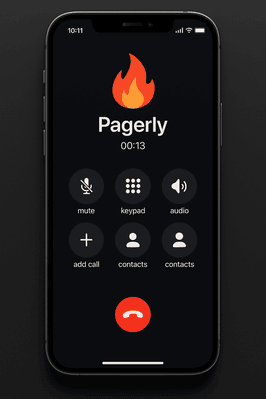
Chat alerts are easy to miss. When production is down, a Slack message can scroll past an engineer who has stepped away, but a phone call or SMS will not. That is why a dedicated pager layer remains essential even for teams that run everything in Slack. The best pager tools combine loud, reliable call and SMS delivery with escalation, so an unanswered page automatically moves to the next responder, and tie that paging to an accurate on-call schedule. Pagerly adds this paging layer on top of a Slack-native workflow rather than forcing a separate console.
What makes a good pager tool
1. Reliable call and SMS
A pager must reach the on-call engineer even when Slack is missed. Pagerly's on-call paging calls and texts with escalation.
2. Escalation policies
If the first responder misses the page, it should escalate. Pagerly supports multi-level L1 to L2 to L3 escalation.
3. Schedules and overrides
Paging is only as good as the schedule behind it. Create rotations with Pagerly and sync them to a Slack usergroup.
4. Monitoring triggers
Pages should fire from Datadog, Sentry, AWS, and other monitors via integrations.
5. Noise control
Only real incidents should page a human at night. Pagerly's alert annotation helps suppress noisy alerts so pages stay meaningful.
6. Pricing
Pager pricing should not balloon with team size. See pricing; Pagerly charges paging at $4 per user per month on a flat per-team plan.
The best pager tools for developers
1. Pagerly (best overall)
Pagerly drives reliable paging from Slack with escalation, schedules, and incident response, used by 1,000+ orgs including 1Password, Disney+, Spotify, and Loom. Set up paging using the paging docs.
Pros: Call and SMS, escalation, Slack-native, flat plan. Cons: Slack-centric. Best for: Developer teams in Slack.
2. PagerDuty
Enterprise-grade paging priced per user. See Pagerly vs PagerDuty and the pricing breakdown.
3. Splunk On-Call
Legacy VictorOps paging for Splunk customers. See Pagerly vs Splunk On-Call.
4. Spike.sh
Budget paging and alerting for small teams. See Pagerly vs Spike.sh.
Comparison
ToolCall and SMSSlack-nativePricingPagerlyYesYesFlat plan plus $4/user pagingPagerDutyYesPartialPer userSplunk On-CallYesAlert-focusedEnterpriseSpike.shYesAlert-focusedLow-cost
How to choose
- Slack-first team: Pagerly.
- Enterprise with procurement: PagerDuty.
- Splunk customer: Splunk On-Call.
- Tiny budget: Spike.sh.
Common paging mistakes to avoid
- Paging everyone. Page the current on-call only, using a synced usergroup, not a broad channel.
- No escalation. Always set a backup so an unanswered page is retried.
- Paging on noisy alerts. Filter and annotate so only real incidents wake someone.
- Stale schedules. Keep rotations and overrides current so the right person is paged.
Use-case cheat sheet
- Developer who wants 3 a.m. calls only for real incidents: Pagerly paging plus alert annotation to cut noise.
- Team syncing schedules from PagerDuty: Pagerly usergroup sync.
- Cost-sensitive startup: Pagerly flat plan.
- Team with layered severity: Pagerly multi-level escalation.
Getting started with Pagerly paging
- Add Pagerly to Slack and build or import your rotation.
- Enable call and SMS paging for high-severity alerts.
- Define L1 to L2 to L3 escalation so missed pages are retried.
- Connect monitors through integrations so pages fire automatically.
Frequently asked questions
Basics
What is a pager tool? A pager tool alerts the on-call engineer by call, SMS, or push when an incident occurs, and escalates if unanswered. Pagerly does this from Slack.
Is Slack enough without a pager? No. Slack messages can be missed; call and SMS paging guarantees the on-call engineer is reached.
Features
Does Pagerly escalate unanswered pages? Yes, through multi-level escalation policies.
Pricing
How is Pagerly paging priced? Paging is $4 per user per month on top of a flat per-team plan. See pricing.
Migration
Can I integrate my existing paging tool? Yes, per the integration docs.
Why Pagerly is the best pager tool for developers
Pagerly delivers reliable call and SMS paging with escalation, driven from Slack alongside scheduling and incident response, at flat per-team pricing. See paging, the incident bot, and pricing, or read the docs. Add Pagerly to Slack for free.